Keeping Track of Claude Code Usage
Disclaimer: This post was written with the assistance of Anthropic’s Claude Opus 5.5 model, which also helped build and debug the setup it describes.
At the moment, I use Claude Code on four machines: a laptop, two Linux VMs and a Mac. This changes from time to time. I also use more than one account, each with a Max 20x subscription. Usually more than one session is running, each in a different project. I wanted to see the usage per project and per day, in one place, kept for a long time.
Claude Code Telemetry
Claude Code can export its own telemetry with OpenTelemetry (OTel). When it is turned on, it sends two kinds of data:
- Metrics: counters of tokens (input, output, cache read and cache creation) and an estimated cost. Each counter carries labels such as the model, the effort level, the account and whether the request came from the main thread or a subagent.
- Events: one record per API request, with its tokens, cost, duration and request id.
The cost is an estimate based on the API list prices. It is not what a subscription charges, but it is a good measure for comparing projects and days.
Claude Code does not know what a “project” is. Since telemetry lets you add your own attributes, I add the project name myself when a session starts.
System Overview
The setup runs on my existing monitoring stack:
digraph g {
  rankdir=LR
  node[style=filled, shape=box]
  clients[label="Claude Code\n(machine 1)"]
  clients2[label="Claude Code\n(machine 2)"]
  otelcol[label="OpenTelemetry\nCollector"]
  prometheus[label="Prometheus"]
  grafana[label="Grafana"]
  events[label="event log"]
  storage[label="long-term\nstorage"]
  clients -> otelcol [label="OTLP"]
  clients2 -> otelcol [label="OTLP"]
  otelcol -> prometheus [label="metrics"]
  prometheus -> grafana
  otelcol -> events [label="events"]
  events -> storage [label="weekly"]
}
- Clients. On every machine, Claude Code’s user settings turn telemetry on and point it to the collector. A small shell wrapper around the
claudecommand finds the project name and adds it, together with the hostname, as an OTel resource attribute. The project is the git repository the session starts in, or a name given in a small file in a parent directory. - Collector. An OpenTelemetry Collector runs on the monitoring VM. It receives the data over OTLP, turns the metrics into Prometheus format, and writes the events to a log file. I needed the collector because the Prometheus package in Ubuntu is built without its own OTLP receiver.
- Prometheus. It scrapes the collector every minute and keeps the data for two years.
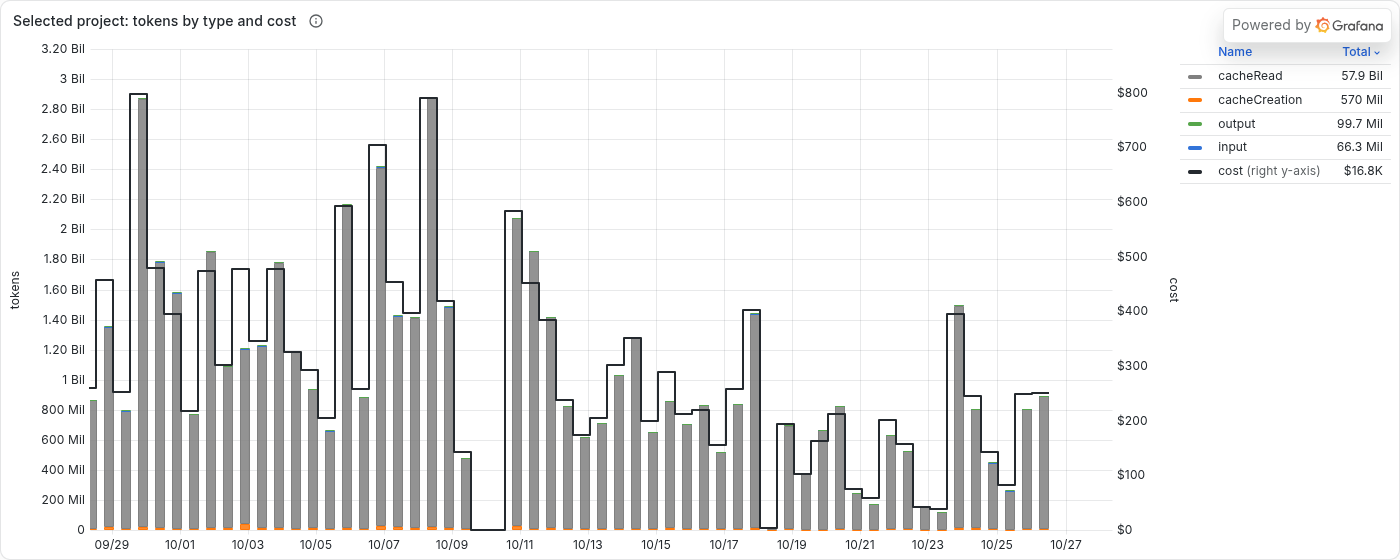
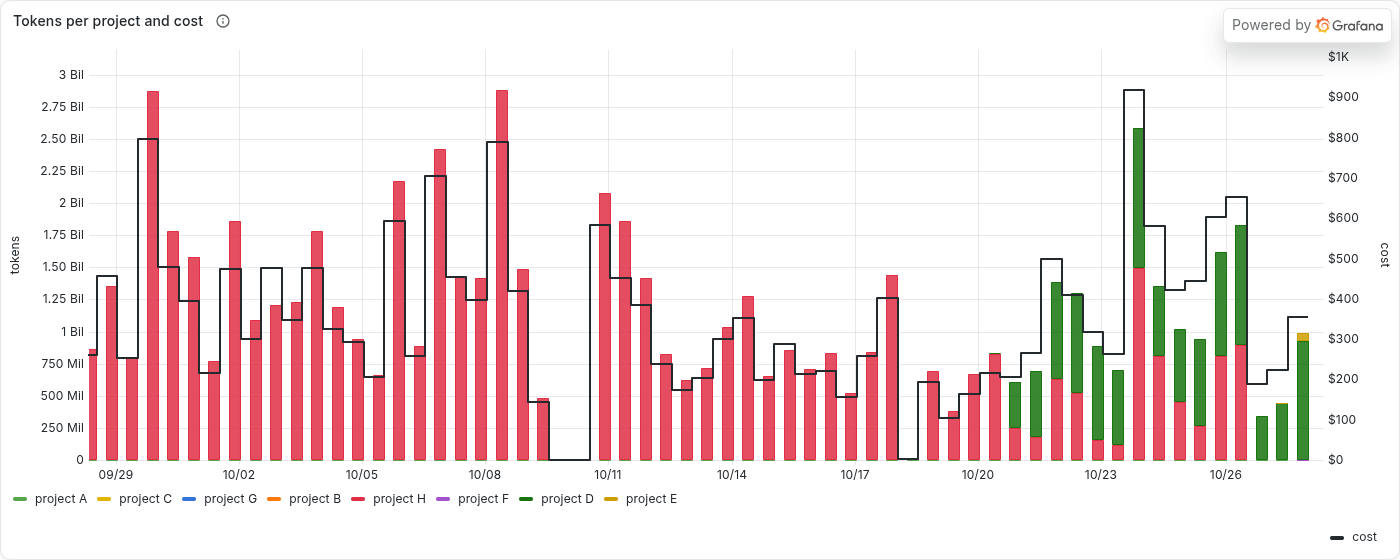
- Grafana. One dashboard shows the usage of a selected project as bars by token type with the cost on top, and the usage of all projects stacked together. Totals per project for the selected time range sit below.
- Archive. The event log is the permanent record. It is copied to long-term storage every week, so it is kept even after Prometheus deletes old data.
A request shows up on the dashboard about two minutes after it is made.
The first chart shows one project over the last 30 days. The bars are the tokens per day by type, and the line is the estimated cost:
The second chart shows all projects stacked together, with the total cost as a line:
Things That Were Not Obvious
Most of the work was not the setup itself but getting the numbers right.
- Counting new series. The usual way to sum a counter over a time range in Prometheus misses the first value of every new series. A project with a single session would show zero. The dashboard uses a rule that counts a series’ whole value when it first appears in the range. I checked the result against the event log until they matched exactly.
- Counter resets. The same rule has a weak point: if a counter of a new series resets within the range, the part before the reset is lost. A restart of the collector causes such a reset.
Conclusion
The setup is simple: Claude Code sends telemetry, a collector passes it to Prometheus, and Grafana shows it. Most of the effort went into making the numbers exact, mainly counting new series correctly. Now I can see which project uses how much, which was the goal.

This work is licensed under a Creative Commons Attribution-NonCommercial-ShareAlike 4.0 International License.